An MCP server is a small program that hands an AI assistant tools it can call. MCP stands for Model Context Protocol. Instead of the assistant guessing from training data, it asks the server for live information, and the server answers in a format the assistant can use. The assistant decides which tool to call and what to ask for; the server runs the query and returns the result. About 18,100 searches a month go to "what is an mcp server", according to Google Ads Keyword Planner on November 15, 2026. The useful part is the setup: two addresses, one key, and five tools that turn a chat window into a research desk.
A server is a menu of tools, not a chatbot
A common mix-up is treating the server as the AI itself. It is not. Claude, ChatGPT, Cursor, or VS Code Copilot is the assistant. The MCP server sits behind it and offers a fixed menu of actions. When the reader asks "what is trending on YouTube today?", the assistant picks the matching tool, sends the request, and reads the answer back. It returns rows and numbers, and the assistant turns those into sentences.
That split matters for trust. A server answer can be checked: the rows carry a timestamp, the numbers carry a source, and the same call against the same snapshot should return the same rows. When the assistant answers from memory, there is nothing to check. The server also sets the cost. Each tool call spends requests from a monthly pool, and only successful calls count. Errors are free.
The five tools Trends MCP exposes
Trends MCP exposes five tools over MCP and the same five over REST, as listed in the docs. The docs list them with their cost in requests:
| Tool | What it returns | Cost |
|---|---|---|
get_time_series | Weekly points for a single keyword on a single source, spanning about five years on a 0 to 100 index | 1 request per source |
get_growth | Point-to-point growth over several windows | 1 request per source, every window included |
get_top_trends | A live ranked board, or the biggest climbers against an earlier snapshot | 1 request per 10 rows |
get_context | What people are posting, reading, and betting about a keyword right now | 1 request per source |
get_reviews | The newest customer reviews for a brand, app, product, or place | 1 request per source |
A sixth call, get_usage, is free over MCP and reports the plan, requests used and left, and the reset date. The five tools cover 27 platforms, from Google Search and YouTube to TikTok, Reddit, Amazon, and Steam. One key works for both MCP and REST, so a workflow built in chat can move to code without a second signup.
Two ways to connect: sign in, or an API key
There are two routes: sign in, or an API key, and the client decides which. Claude, ChatGPT, and Claude Code sign in directly, with nothing to paste. In Claude, go to Settings, then Connectors, and add a custom connector named Trends MCP with this URL:
https://www.trendsmcp.ai/mcp
Claude Code takes one terminal command instead:
claude mcp add --transport http --scope user trends-mcp https://www.trendsmcp.ai/mcp
Cursor, VS Code, and other clients that send an API key use a second address, https://api.trendsmcp.ai/mcp, with this config:
{"mcpServers": {"trends-mcp": {"url": "https://api.trendsmcp.ai/mcp", "headers": {"Authorization": "Bearer <your key>"}}}}
A free key comes from an email address and an 8-digit code. No password, no card, and 100 requests a month on the free tier. The key belongs on the server side, never in browser code or a public repository. If it leaks, a new one can be made on the account page. For the REST side, send the same key as Bearer <key> in the Authorization header of a POST to https://api.trendsmcp.ai/api, and put the tool name in the mode field of the JSON payload. Note the response body is itself a JSON string, so parse it a second time.
What a first question returns
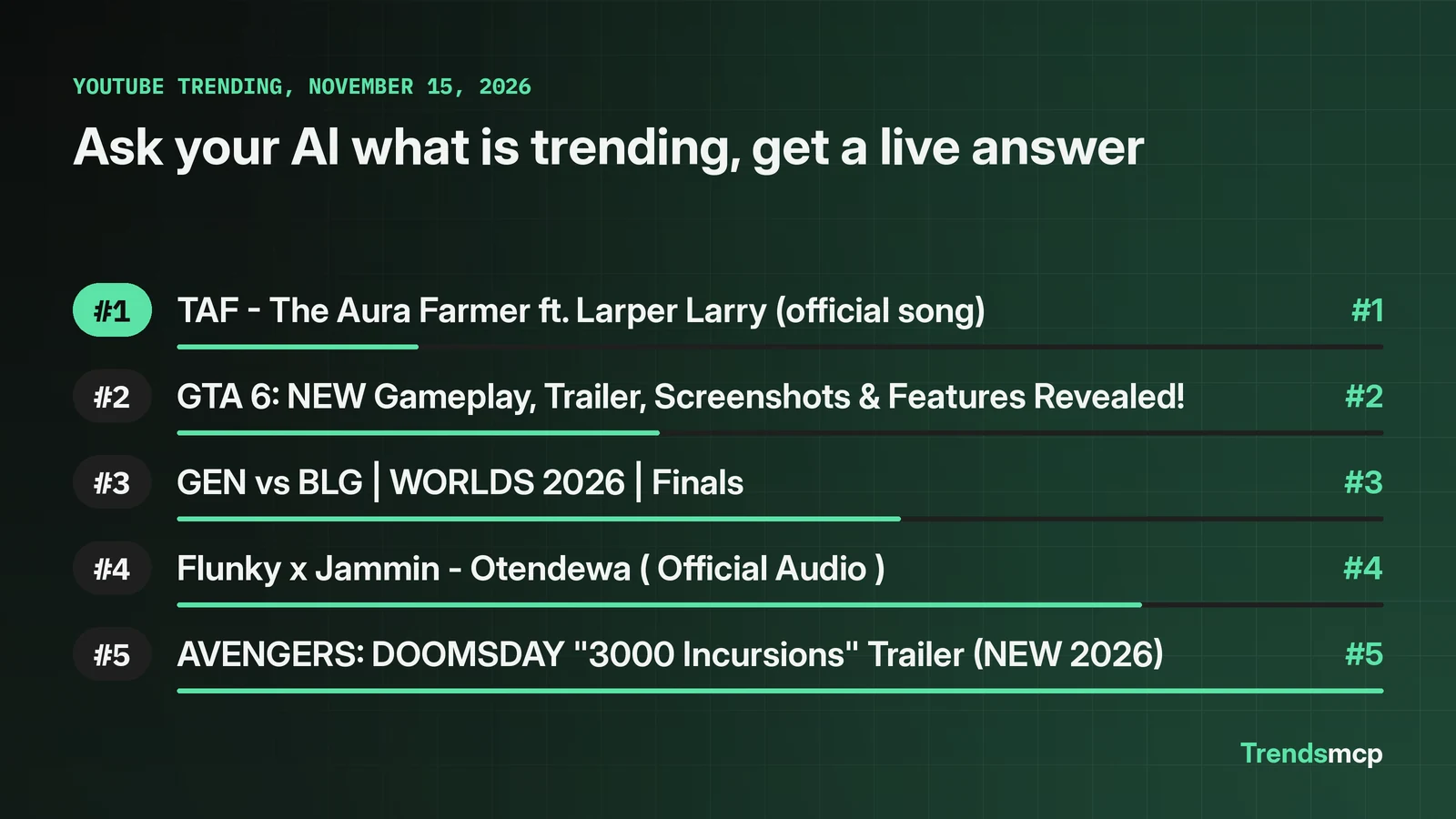
A real call to the YouTube board on November 15, 2026, at 09:01 UTC returned a live top five, with the board timestamp attached. The test question from the docs is "Using Trends MCP, what is trending on Google right now?" Here is what the YouTube board answered instead:
- TAF - The Aura Farmer ft. Larper Larry (official song)
- GTA 6: NEW Gameplay, Trailer, Screenshots & Features Revealed!
- GEN vs BLG | WORLDS 2026 | Finals
- Flunky x Jammin - Otendewa ( Official Audio )
- AVENGERS: DOOMSDAY "3000 Incursions" Trailer (NEW 2026)
The assistant receives those rows with the board timestamp, then answers in prose. The check that matters is the tool call itself: expand it in the conversation and confirm it used Trends MCP and returned the board, rather than a plausible answer written from memory. A full walkthrough of that check lives in the Claude trend research workflow, and the MCP server for Claude page covers the sign-in route in detail.
What 100 free requests actually buy
As of November 15, 2026, every plan has a monthly pool of requests. Free gives 100 a month, Starter 1,000, Pro 5,000, and Business 25,000. A get_top_trends call for the default 100 rows costs 10 requests, so a free tier covers ten full boards a month, or far more single-keyword calls, since a time series or growth call costs one request per source. When the pool runs out, calls return a plan-limit message until the next month or an upgrade.
Two limits deserve a plain statement. First, the data is only as fresh as the board behind it. On November 15, the Google Trends board snapshot was dated November 4, eleven days old, while YouTube, Wikipedia, and Steam were current to the day. A server can only return what its upstream source has published, so check the as_of_ts on any board answer before quoting it. Second, an MCP server gives an assistant data, not judgment. It will return a rising keyword with no explanation of why it rose; the cause still needs a news source or a get_context call, and a rank move is not proof that an event happened.
The first check after connecting
Once connected, run the test question, expand the tool call in the conversation, and confirm it used Trends MCP and returned the board with a timestamp. That one check separates a working setup from an assistant answering from memory.